

Options Analysis
TradingView

Options Chart+

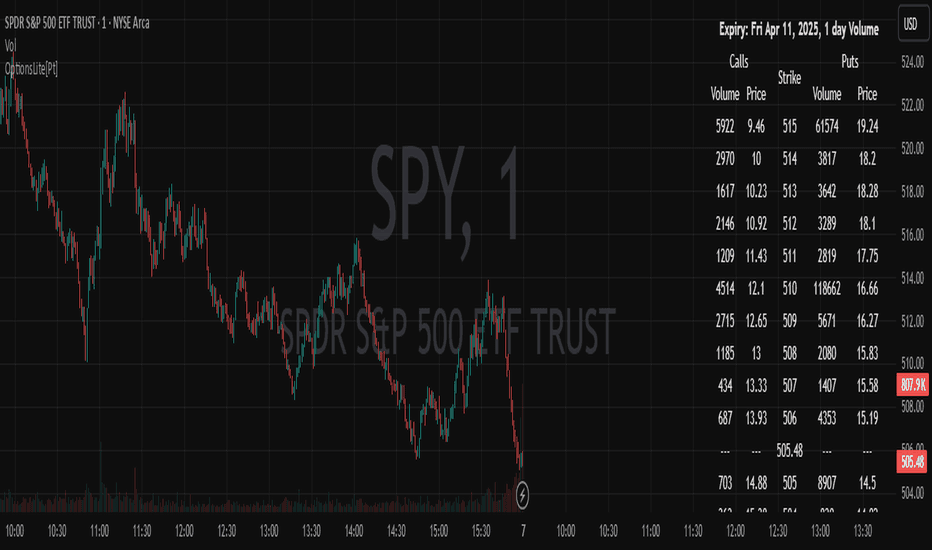
Read selected-expiry options prices and volume alongside your chart.

  • Selected-expiry call and put table
  • Strike-level chart overlays
  • Implied-move and volume-based sentiment context

Choose the edition for your platform. Features, subscriptions and access are separate.

PTGAMBLER / CHART WORKSPACE
Actual TradingView product output. Historical example; the chart is not live.
Options Chart+ running on TradingView, showing its actual chart output

Actual TradingView product output. Historical example; the chart is not live.

The analytical question

Where are options activity and modeled exposure concentrated?

Selected-expiry option prices and volume; strike table and overlays; implied-move and volume-based sentiment metrics. Feed and valid-chain inputs required.

Explore the publication and release notes

Two platform editions

Choose the context you need.

The shared name identifies the product family. Each edition has its own data, features and purchase path.

TradingView

Options prices & volume

Selected-expiry call and put prices, volume, strike overlays and volume-based positioning context. The free Lite edition offers a simpler table.

An optional SPY/SPX/ES Converter+ workflow helps map SPY options information onto related index and futures charts.

Read the TradingView tool guide
TrendSpider

Options chain & modeled exposure

Selected-expiry volume and open-interest profiles, Greeks, implied volatility and estimated gamma exposure. A separate monthly marketplace subscription applies.

GEX is modeled exposure. It does not establish actual dealer positions or guarantee a market response.

Compare TrendSpider options tools

From publication to chart

Set up with the right inputs.

Start with TradingView access, then confirm the data and settings for this tool.

  1. Open the linked TradingView publication and review its current requirements.

  2. Follow the current purchase instructions; invite-only access must be granted to your TradingView username.

  3. Choose a supported underlying, expiry and strike range before interpreting the table.

Need help with access or missing data? Visit support.

More on TradingView

Explore the same question.

Compare the differences before adding another tool to your workflow.

TradingViewFree

Options Chart Lite

Start with a simplified call and put price-and-volume table.

Free on TradingView

14-day free trial

Try a TradingView tool

Checking your account and trial availability…